
What is an SSD?: Solid State Drive Explained
Updated: May 26

An SSD, also called a Solid State Drive, is the storage device inside a computer that holds your files, games, programs, photos, videos, and operating system. In simple terms, it is where your computer stores almost everything.
Most modern computers use SSDs because they are much faster than older hard drives (HDDs). A computer with an SSD can boot up quicker, open applications faster, and feel far more responsive during everyday use.
Unlike older HDDs that use spinning mechanical disks, SSDs use flash memory with no moving parts. This makes them quieter, faster, and generally more reliable for normal use.
SSDs come in many different sizes, brands, and speed levels. Some are designed for basic everyday computing, while others are built for gaming, video editing, or high-performance systems. Although SSDs usually cost more than traditional hard drives, they have become the standard storage option in most modern devices.
How Does an SSD Work?
An SSD stores data (such as files, apps, games, photos, etc.) using flash memory chips instead of spinning magnetic disks. Since there are no moving parts involved, the drive can access files much faster than a traditional HDD.
This helps reduce loading times for:
Operating systems
Games
Applications
File transfers
System updates
In simple terms, an SSD allows your computer to retrieve information almost instantly compared to older storage technology.
Why Are SSDs Faster Than HDDs?
Traditional hard drives use physical spinning platters and moving read/write heads to locate data. This mechanical process is much slower than the electronic storage used by SSDs.
Because SSDs do not need to physically search for files, they can:
Boot Windows faster
Open programs quicker
Reduce game loading times
Improve overall system responsiveness
Transfer files more efficiently
For many users, upgrading from an HDD to an SSD is one of the biggest performance improvements they can make to a computer.
SSD vs HDD Comparison
Feature | SSD | HDD |
Speed | Very Fast | Slower |
Noise | Silent | Can make spinning/clicking noises |
Moving Parts | None | Yes |
Durability | More durable | More fragile |
Power Usage | Lower | Higher |
Cost Per GB | Higher | Lower |
HDDs are still commonly used for large and inexpensive storage, while SSDs are preferred for operating systems, gaming, and everyday computing.
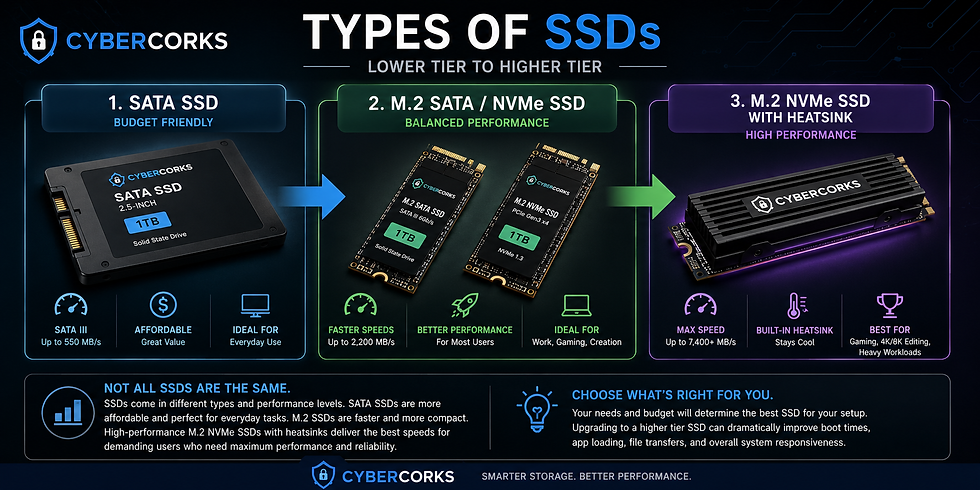
Types of SSDs
There are several different types of SSDs available today.
SATA SSD
SATA SSDs are one of the older SSD formats, but they are still much faster than traditional hard drives. They are commonly used as affordable upgrades for older computers.
NVMe SSD
NVMe SSDs are newer and significantly faster than SATA SSDs. They are often used in gaming PCs, workstations, and modern laptops.
M.2 SSD
M.2 refers to the physical shape and connection style of the SSD. Some M.2 drives use SATA speeds, while others use faster NVMe technology.
Are SSDs Better for Gaming?
Yes, SSDs are generally better for gaming.
Games installed on an SSD usually:
Load faster
Start quicker
Stream textures more efficiently
Reduce loading screens
While an SSD will not directly increase FPS in most games, it can improve the overall gaming experience and responsiveness of the system.
Are SSDs Better for Productivity Work?
SSDs are excellent for productivity tasks such as:
Web browsing
School work
Office applications
Video editing
Programming
File management
Applications open faster, systems feel smoother, and multitasking becomes more responsive.
Are SSDs Good for Long-Term Storage?
SSDs are reliable for everyday storage, but many users still use HDDs for large backups because they are cheaper for storing massive amounts of data.
For important files, it is always recommended to keep backups regardless of the storage type being used.
Can SSDs Fail?
Yes. Like any storage device, SSDs can eventually fail over time.
However, modern SSDs are generally very reliable for normal consumer use. Most users will replace their computer before the SSD reaches the end of its lifespan.
Regular backups are still important, especially for important documents, photos, or work files.
Frequently Asked Questions
Is SSD faster than HDD?
Yes. SSDs are significantly faster than HDDs in most situations.
Is SSD better for gaming?
Yes. SSDs reduce loading times and improve overall responsiveness in games.
Is SSD better for everyday use?
Yes. SSDs make computers feel much faster for normal daily tasks.
Why are SSDs more expensive?
SSDs use newer flash memory technology, which costs more than traditional hard drive storage.
How long do SSDs last?
Most modern SSDs can last many years under normal usage conditions.
Can I upgrade my laptop to an SSD?
Many laptops support SSD upgrades, though compatibility depends on the specific model.
Are SSDs safe to use?
Yes. SSDs are widely used and considered reliable for modern computing.


Comments